
wp2shell: WordPress Left the Batch Door Open. Your WAF Can Close It.
A cross-vendor emergency WAF rule pack for WordPress CVE-2026-63030 and CVE-2026-60137, covering Cloudflare, AWS WAF, F5 Distributed Cloud, Fastly, Akamai, Azure, and Google Cloud Armor.


wp2shell is the public name for the WordPress Core chain combining CVE-2026-63030, REST API batch-route confusion, with CVE-2026-60137, SQL injection. The RCE chain affects WordPress 6.9.0 through 6.9.4 and 7.0.0 through 7.0.1. Patch to 6.9.5 or 7.0.2 now. WordPress 6.8.0 through 6.8.5 has the related SQL injection and should move to 6.8.6.

CVE-2026-63030 is a critical WordPress RCE. Your WAF can buy patch time. It cannot be the patch.
Cloudflare shipped managed rules for both CVEs. The other major cloud WAF providers had no publicly announced wp2shell-specific managed rules when this post was published. That is not a reason to wait. The shared emergency control is simple: block every POST request to either WordPress REST batch route. This post gives the native configuration shape for Cloudflare, AWS WAF, F5 Distributed Cloud, Fastly, Akamai, Azure, and Google Cloud Armor.
Do not attempt to make this rule “anonymous only” at the edge. WordPress authentication is application state, not a portable WAF signal. Cookies and headers are not a safe substitute. Test in Count or Log mode briefly, move to Block, patch from a trusted source, then remove the temporary broad control when patch state is verified.
Scope: containment, not a reproduction guide
This is not an exploit walkthrough. The public advisory already establishes the operational fact: WordPress versions 6.9 and higher contain a batch-route confusion weakness that combines with CVE-2026-60137 to produce remote code execution. A public proof of concept exists. That changes the clock.
A WAF does not repair the vulnerable code path. It provides a short containment window and an evidence source while patching is completed. The relevant question is whether every exposed WordPress site has a verified fixed version and whether every ingress path to the origin enforces the same temporary policy.
The one control every provider must implement
The vulnerable REST batch endpoint can be reached in two common forms:
/wp-json/batch/v1/?rest_route=/batch/v1
The emergency rule contract is:
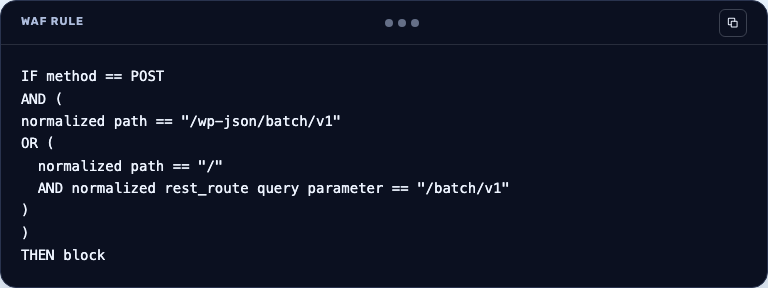
Normalize encoded slashes and URL-encoded query values before matching. Do not rely solely on a CDN rule if the load balancer, origin IP, alternate hostname, or legacy DNS record is reachable directly.
This is deliberately a broad and temporary control. REST batching is supported functionality, so test editor, plugin, and automation workflows in Count or Log mode. If a business-critical workflow needs an exception, use a separate rule restricted to a verified fixed source or a strongly authenticated integration path. Do not create a generic browser, cookie, or IP-range allowlist that reopens the public endpoint.
AWS WAF uses a directly usable Web ACL rule payload. The F5, Fastly, Akamai, and Azure examples show the exact field values to enter in each vendor’s rule builder, not an import format.
Cloudflare: custom WAF rule plus the published managed rules
Create a Custom WAF Rule with a Block action. Use this expression as the emergency path control:
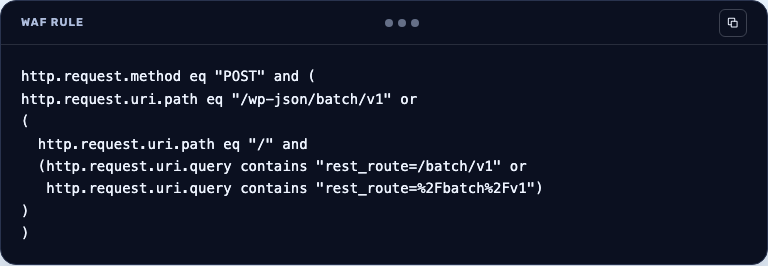
Cloudflare also shipped two managed rules on July 17, 2026. Keep both in Block mode: Wordpress - SQL Injection - CVE:CVE-2026-60137 and Wordpress - Remote Code Execution - CVE:CVE-2026-63030. Their Managed Rules IDs are 1c060d3a371549219ee290d7ed933fcc and 7dfb2bd4708d4b88b9911dc0550664b6.
Use Security Events to confirm that the temporary custom rule catches only the intended route. Remove ruleset-level overrides that downgrade the managed rules to Log.
AWS WAFv2: two explicit Web ACL rules
Create two custom rules with action Block and a priority above rules that would allow the request. AWS WAF is clearer and safer here as two explicit statements.
Rule one combines Method = POST with UriPath = /wp-json/batch/v1. Apply the URL_DECODE transformation before the exact path comparison. Rule two combines Method = POST, UriPath = /, and a SingleQueryArgument named rest_route with an exact /batch/v1 match. Apply URL_DECODE to the query-argument comparison.
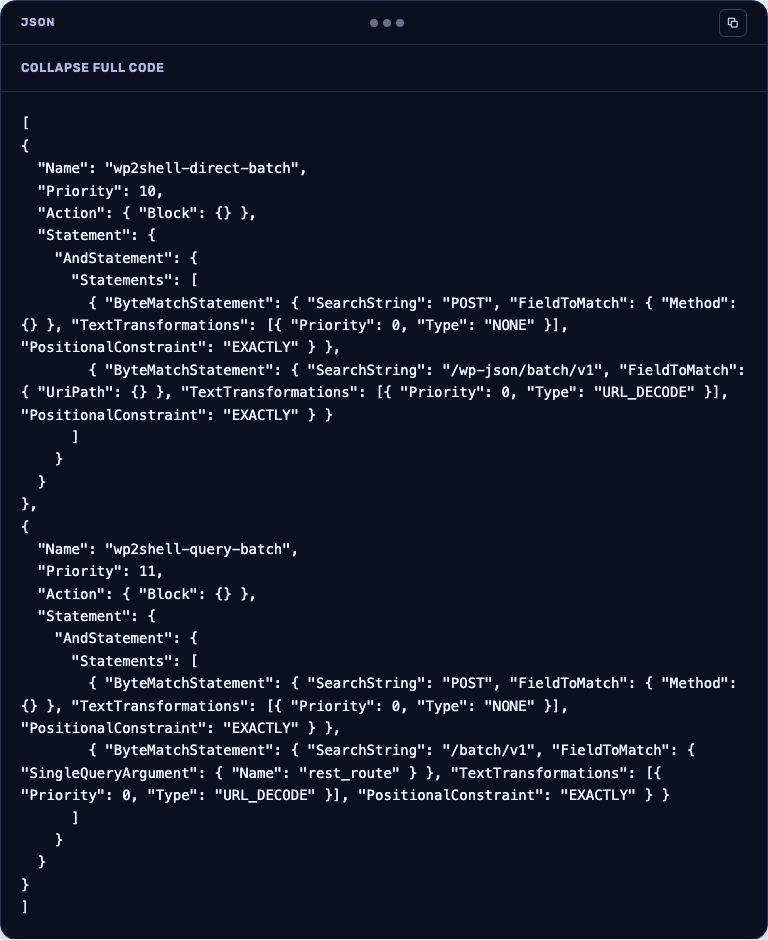
For both rules, use Count during the shortest workable validation window, inspect sampled requests and CloudWatch logs, then change the action to Block. Attach the Web ACL to every CloudFront distribution and Application Load Balancer that fronts the affected site.
F5 Distributed Cloud: HTTP Load Balancer service policy
In the F5 Distributed Cloud console, attach a service-policy rule to the HTTP Load Balancer serving the WordPress site. Configure a Deny action for POST requests where the route matches /wp-json/batch/v1. Add a second Deny rule for POST / where the rest_route query value resolves to /batch/v1.
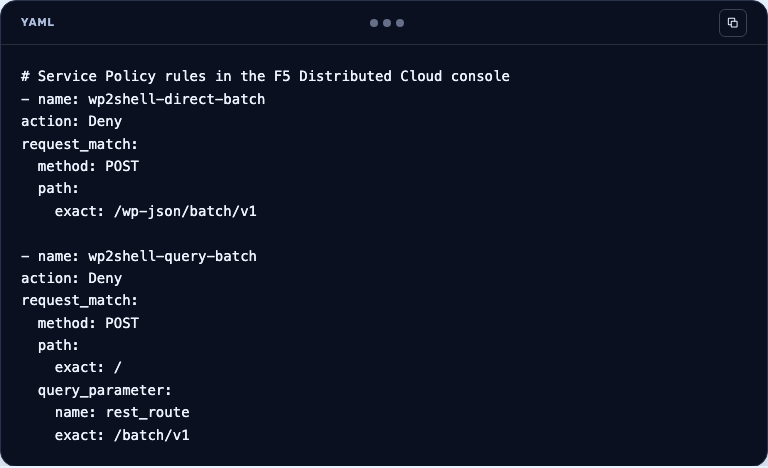
Place both controls before broad allow or routing rules. F5 Distributed Cloud evaluates policy order, so a later deny rule cannot recover a request already allowed earlier. Validate on a non-production namespace or in report mode where available, then enforce Deny at every load balancer and origin path that serves the site.
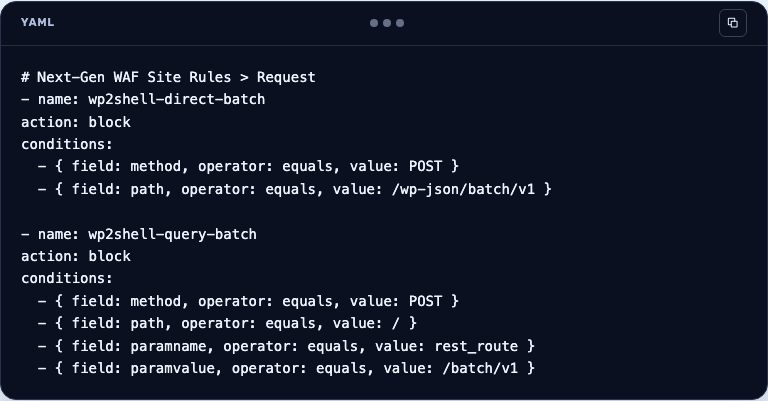
Fastly Next-Gen WAF: Request Rules
In Next-Gen WAF, create a Site Rule of type Request with action Block. For the path route, set method to POST and path to the exact value /wp-json/batch/v1.
Create a second Request Rule for the query route: method = POST, path = /, paramname = rest_route, and paramvalue = /batch/v1. Fastly treats the path as a relative path, so do not enter the full URL. Use the rule simulation or alerting path only long enough to establish whether a legitimate batch workflow exists, then use Block.
Akamai App & API Protector: Custom Rules
Create two Custom Rules with Deny as the action. The first matches Request Method = POST and Path = /wp-json/batch/v1. The second matches Request Method = POST, Path = /, and a query-string condition for rest_route=/batch/v1 after URL decoding.
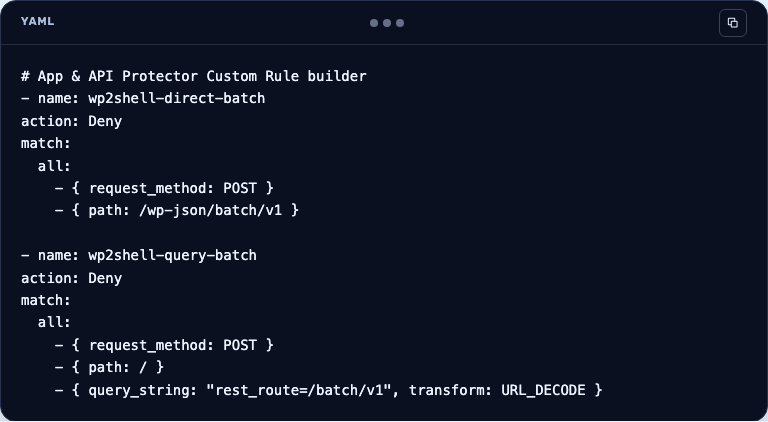
Custom Rules are the right Akamai control for a newly disclosed vulnerability that is not yet covered by a named standard rule. Put the rules above broad exception rules, deploy to a staging security configuration first, activate the configuration, and review Security Events before enabling Deny in production.
Azure WAF: Application Gateway and Front Door custom rules
For Application Gateway WAF v2, create two Match Rules with action Block and a lower priority number than generic allow rules. Each rule requires RequestMethod Equal POST. The first adds RequestUri Equal /wp-json/batch/v1. The second adds RequestUri Contains rest_route=/batch/v1, with URL decoding enabled. Scope it to the WordPress listener rather than a shared gateway when possible.
For Azure Front Door WAF, create the equivalent two custom Match Rules in the Front Door policy. Use RequestMethod and RequestUri match variables, activate the policy on every Front Door domain that routes to the WordPress origin, and verify that the policy is associated with the correct route.
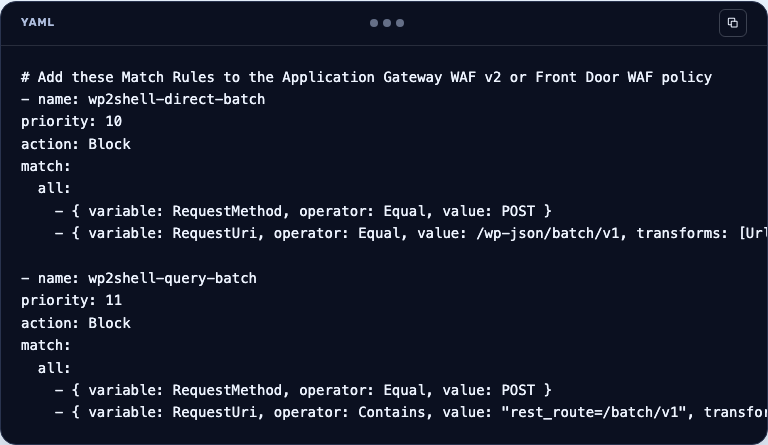
Keep CRS or DRS enabled. These custom rules are a short virtual patch for one exposed route, not a replacement for managed protections or the WordPress update.
Google Cloud Armor: CEL expression rule
Add a Cloud Armor custom rule with deny-403 as its action. This expression covers both endpoint forms:
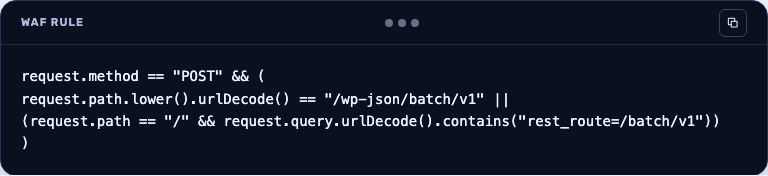
Deploy the rule at a priority that evaluates before broad allow rules. Attach the security policy to every external Application Load Balancer backend service serving WordPress. Use Cloud Armor request logs to test the expected match behavior before enforcing deny-403.
What to hunt while the control is active
One WAF event is not a compromise finding. Look for correlation in a short window:
- Anonymous POST traffic to the normalized REST batch route, often returning
207 Multi-Status. - A newly created WordPress administrator.
- A login or session using that identity.
- Plugin, theme, MU-plugin, drop-in, or PHP-file changes.
The privileged action can happen inside the original WordPress request. There may be no separate users-endpoint entry in edge access logs. Read WAF logs, CDN logs, origin access logs, PHP logs, database evidence, administrator history, and file telemetry together.
Patch, verify, then remove the broad rule
The emergency policy is intentionally temporary. Patch WordPress from a trusted source, verify the installed version and checksums, inspect administrator and file changes, then remove the route block only after the fixed version is confirmed across every public site.
The lesson is bigger than wp2shell. Vendor managed coverage can be fast, slow, or absent. Your response should not depend on which one occurs. Huskeys helps teams see which edge paths are protected, which are bypassable, and where policy drift leaves the emergency control only half deployed.
Sources
wp2shell is an exploit chain that combines a WordPress REST API batch-route bug (CVE-2026-63030) with a SQL injection (CVE-2026-60137) to achieve remote code execution.
The full RCE chain affects WordPress 6.9.0–6.9.4 and 7.0.0–7.0.1; update to 6.9.5 or 7.0.2. Versions 6.8.0–6.8.5 are affected by the related SQL injection and should move to 6.8.6.
Block POST requests to the two batch routes, /wp-json/batch/v1 and /?rest_route=/batch/v1, after URL-decoding and normalizing the request so encoded variants can't slip through. Because REST batching is legitimate functionality, test in Count or Log mode first. The post includes rules for Cloudflare, AWS WAF, F5 Distributed Cloud, Fastly, Akamai, Azure and Google Cloud Armor.
Not by cookies or headers. WordPress authentication is application state, not a signal the WAF can reliably evaluate, and generic cookie, browser or IP-range allowlists reopen the endpoint. The only safe exception is a separate, narrow rule for a verified fixed source or a strongly authenticated integration.
Look for anonymous POST requests to the batch routes (often returning 207 Multi-Status), new administrator accounts and their logins, and changes to plugins, themes, MU-plugins or PHP files. Remove the rule only after the fixed version and file checksums are verified on every public WordPress site.